












![Roblox: Simpsons [HORROR]](https://arbcdn.techfast.vn/0b51753c5bc9486bb6dfb8974ef220ab.webp)



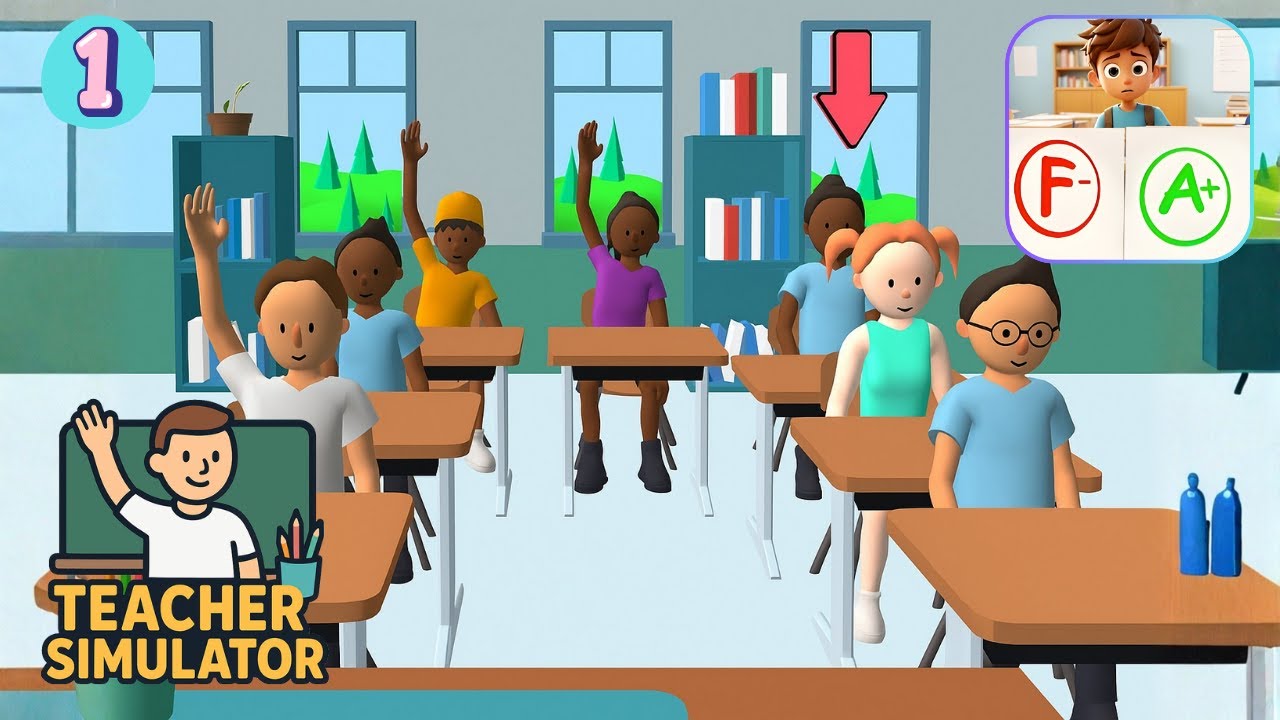
Teacher Simulator: Become the Ultimate Classroom Boss in This Addictive School Game
Introduction
Ever wondered what it feels like to stand at the front of a classroom and be in total control? Teacher Simulator turns that curiosity into an engaging and surprisingly chaotic gaming experience. This browser-based simulation game puts you in the role of a teacher tasked with handling everything from grading assignments to managing misbehaving students.
Unlike traditional simulation games, Teacher Simulator blends humor, quick decision-making, and real-life classroom scenarios into bite-sized gameplay sessions. Whether you're answering quiz questions, catching cheaters, or breaking up hallway drama, the game constantly keeps you on your toes.
In this guide, we’ll break down everything you need to know—from gameplay mechanics to expert tips—so you can dominate the classroom like a pro.
What Is Teacher Simulator?
Teacher Simulator is a casual simulation game where players step into the shoes of a teacher navigating the daily challenges of school life. The game focuses on interactive mini-scenarios such as asking questions, grading papers, and maintaining classroom discipline.
Players must make quick decisions that directly impact their performance and reputation as a teacher. The goal? Become the best teacher possible—or at least survive the chaos.
The game is available on multiple platforms, including browsers and mobile devices, making it easy to jump in anytime.
Core Gameplay Overview
At its core, Teacher Simulator revolves around simple yet engaging mechanics that are easy to learn but hard to master.
1. Asking Questions
One of the main tasks is quizzing students. You’ll ask questions, and multiple students will raise their hands with answers. Your job is to pick the correct one.
Sounds easy? Not quite.
- Some students try to trick you with wrong answers
- Time pressure forces quick thinking
- Accuracy directly affects your score
This mechanic tests both your knowledge and decision-making speed.
2. Grading Assignments
Another major feature is grading student work.
You’ll:
- Mark correct answers with a check ✔️
- Mark incorrect answers with an X ❌
- Ensure fairness and accuracy
This part of the game mimics real-life teacher responsibilities and adds a satisfying rhythm to gameplay.
3. Classroom Management
Teaching isn’t just about academics—it’s also about discipline.
In Teacher Simulator, you’ll deal with:
- Cheating students
- Classroom disruptions
- Bullying situations
- General chaos
Players must react quickly to maintain order and avoid losing control of the class.
4. Mini-Games and Scenarios
The game keeps things fresh by introducing a variety of mini-games, such as:
- Spotting cheaters during exams
- Handling pop quizzes
- Managing hallway incidents
- Completing quick decision challenges
Each scenario adds variety and prevents gameplay from becoming repetitive.
Why Teacher Simulator Is So Addictive
Fast-Paced Gameplay
Unlike slow simulation games, Teacher Simulator is quick and dynamic. Each level lasts only a few minutes, making it perfect for short gaming sessions.
Relatable Humor
The game shines with its humorous take on school life. From silly student answers to over-the-top classroom chaos, it delivers constant entertainment.
Simple Controls
The controls are straightforward:
- Mouse clicks or taps
- Easy decision-based actions
This accessibility makes the game suitable for all age groups.
Real-Life Scenarios
The game mirrors real classroom situations, including:
- Grading exams
- Managing student behavior
- Handling unexpected problems
This realism makes the experience both fun and immersive.
How to Play Teacher Simulator
If you're new to the game, here’s a quick step-by-step guide:
Step 1: Start the Game
Launch the game in your browser or mobile device.
Step 2: Follow Instructions
Each level begins with a simple objective, such as answering questions or grading papers.
Step 3: Make Decisions Quickly
Speed matters. Choose the correct answers or actions before time runs out.
Step 4: Maintain Control
Handle disruptions and keep your classroom under control.
Step 5: Progress Through Levels
Complete tasks successfully to unlock new challenges and scenarios.
Pro Tips to Master the Game
Want to become the best teacher in the game? Follow these expert tips:
1. Focus on Accuracy
Don’t rush blindly—correct decisions matter more than speed.
2. Watch Student Behavior
Some students give obvious clues when they’re wrong or cheating.
3. Stay Calm Under Pressure
The game throws chaotic situations at you—keep your cool.
4. Learn Patterns
Over time, you’ll notice patterns in questions and scenarios.
5. Balance Speed and Precision
You need both quick thinking and accuracy to succeed.
Key Features of Teacher Simulator
Here’s what makes the game stand out:
- Interactive classroom simulation
- Decision-based gameplay
- Educational and entertaining
- Fast-paced levels
- Humorous scenarios
- Cross-platform compatibility
Pros and Cons
Pros:
- Easy to play, hard to master
- Highly engaging gameplay
- Great for casual gamers
- Realistic and funny scenarios
Cons:
- Repetitive mechanics over time
- Limited depth compared to full simulation games
- Can feel chaotic at higher levels
Who Should Play Teacher Simulator?
This game is perfect for:
- Casual gamers looking for quick fun
- Students curious about teaching
- Fans of simulation and management games
- Anyone who enjoys humorous gameplay
Educational Value of the Game
While Teacher Simulator is primarily for entertainment, it also offers some educational benefits:
- Improves decision-making skills
- Enhances attention to detail
- Encourages quick thinking
- Provides insight into classroom dynamics
It’s a light but engaging way to experience the challenges of teaching.
How It Compares to Other Simulation Games
Compared to traditional simulation games, Teacher Simulator stands out for its:
- Simplicity
- Fast gameplay
- Humor-driven mechanics
While it may not offer deep customization or long-term strategy, it excels in accessibility and fun.
Final Thoughts
Teacher Simulator is a refreshing take on simulation gaming. By combining humor, quick decision-making, and relatable scenarios, it delivers a fun and addictive experience that keeps players coming back for more.
Whether you want to test your reflexes, enjoy a casual game, or simply experience the chaos of classroom life, this game has something for everyone.
So, are you ready to take control of the classroom?
Because in Teacher Simulator, it’s not just about teaching—it’s about surviving the school day.
FAQ
Is Teacher Simulator free to play?
Yes, the game is available for free on browser platforms and mobile devices.
Can I play Teacher Simulator on mobile?
Yes, it supports mobile devices, tablets, and desktop browsers.
Is Teacher Simulator educational?
Partially. While it’s mainly for entertainment, it includes elements of decision-making and classroom management.
Who developed Teacher Simulator?
Versions of the game are developed by companies like Kwalee and other studios depending on the platform.
What makes Teacher Simulator unique?
Its combination of humor, fast gameplay, and realistic classroom scenarios sets it apart from other simulation games.
Conclusion
In a world full of complex games, Teacher Simulator proves that simple ideas can still be incredibly fun. With its mix of quick challenges, relatable content, and engaging mechanics, it’s a must-try for anyone looking for a casual yet addictive gaming experience.
Step into the classroom, take charge, and see if you have what it takes to be the ultimate teacher.