







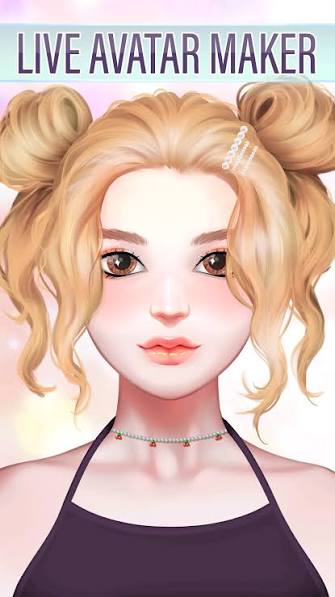





Creating a character in Live Avatar Maker: Girls isn't simply about choosing a dress and hairstyle. The game is built around combining facial features, colors, makeup, hair, clothing, accessories, and expressions to create a personalized anime-inspired avatar.
Instead of levels, enemies, or competitive objectives, the main activity is character design. Players can experiment with different combinations, compare styles, change individual details, and continue editing until the avatar matches the look they have in mind.
That makes Live Avatar Maker: Girls closer to an interactive character creator than a traditional challenge-based game. There is no need to rush. The experience revolves around creativity, visual experimentation, and discovering how small changes can transform the personality of a character.
What is Live Avatar Maker: Girls?
Live Avatar Maker: Girls is an avatar creation and dress-up game focused on designing female anime-style characters. Players begin with a base character and customize different parts of her appearance using the available design tools.
The customization process includes facial details, hairstyles, hair colors, clothing, makeup, accessories, and other visual elements. Instead of giving everyone a fixed character, the game provides different components that can be combined to produce a wide range of looks.
You might create a soft pastel character with light makeup and a cute hairstyle, then completely change the same avatar into a darker or more glamorous design by replacing only a few elements.
There is no single correct result. The objective is simply to create a character you like.
How Live Avatar Maker: Girls gameplay works
The gameplay follows a straightforward customization loop. Start with the base avatar, select the area you want to edit, browse the available options, apply a design, and continue modifying the character until the overall appearance feels complete.
Facial customization provides the foundation. After establishing the face, players can move into hairstyles and colors before choosing clothing and accessories. Makeup and smaller visual details can then be used to refine the final design.
Changes appear directly on the character, making experimentation easy. If one hairstyle doesn't match an outfit, replace it. If the colors clash, try another combination. If the face feels too simple, makeup or accessories can add more personality.
Because there is no traditional win-or-lose condition, much of the gameplay comes from this cycle of selecting, comparing, adjusting, and redesigning.
Customize the face first
The face is one of the most important parts of any avatar because even small adjustments can dramatically change how the character appears.
Live Avatar Maker: Girls provides options for features such as the eyes, lips, skin tone, and other facial details. The supplied description also refers to adjustment tools that can provide additional control over aspects of the character's appearance.
A useful approach is to establish the face before choosing the final outfit. Start with the eyes because they strongly influence the anime-inspired appearance. Next, choose complementary facial details and a skin tone before moving into makeup.
Avoid adding every available effect simply because it is there. A cleaner combination of a few compatible elements can often create a more coherent character than stacking too many visual details together.
Once the face has a clear style, choosing matching hair and clothing becomes easier.
Hairstyles can completely change the character
Hair is another major part of the design process. Changing the hairstyle can make the same face appear cute, elegant, casual, playful, or more dramatic.
Experiment with both shape and color rather than treating them as separate decisions. A hairstyle that works beautifully in one color may create a completely different impression when changed to another shade.
You can also use hair as the starting point for an overall color palette. For example, if you choose a strong or unusual hair color, use clothing and accessories that complement it rather than allowing every part of the avatar to compete for attention.
When testing hairstyles, don't look at the hair in isolation. Consider how it interacts with the face, clothing, and accessories.
A good avatar usually feels like one complete design rather than several unrelated customization choices.
Use makeup to create personality
Makeup provides another way to change the character without replacing the entire face. Different combinations can make an avatar appear softer, brighter, more glamorous, or more stylized.
The original game description includes makeup and facial effects among its customization options. These details are particularly useful after the basic facial structure and hairstyle have already been selected.
Try treating makeup as a finishing layer rather than the first step. Build the face, select the hair, and then choose makeup that supports the direction of the character.
Color coordination is especially useful here. If the outfit already contains several strong colors, more restrained makeup can prevent the design from becoming visually crowded. If the clothing is relatively simple, stronger makeup can become the focal point.
Small details can make a noticeable difference, so experiment before settling on the final combination.
Build an outfit around a clear style
Fashion is a major part of Live Avatar Maker: Girls. The game provides clothing choices that can be mixed with hairstyles, makeup, and accessories to create different aesthetics.
Rather than selecting each item independently, decide what type of character you want to create first. You might aim for something cute and colorful, simple and casual, elegant, or more dramatic.
Once you have a direction, choose clothing that supports it.
Color harmony can make even a relatively simple outfit feel more intentional. You don't need every item to use exactly the same color, but repeating or complementing a few shades can tie the character together.
If the outfit already has a strong visual identity, avoid overwhelming it with too many accessories. If the clothing is simple, accessories can provide the extra detail needed to make the avatar distinctive.
Accessories should support the design
Accessories such as glasses, earrings, hats, and other decorative elements can help complete an avatar, but they work best when they have a clear purpose.
For example, glasses can change the personality of a face even when nothing else is altered. Earrings can add detail around the hair and face, while a hat may become one of the strongest elements in the entire outfit.
The important point is balance.
Adding every accessory at once can make it difficult to identify the character's main visual feature. Instead, choose one or two elements that strengthen the style you've already created.
If an accessory draws attention away from the face or clashes with the hairstyle, remove it and compare the result. Avatar creation often improves through subtraction as much as addition.
Animated expressions bring the avatar to life
One feature highlighted in Live Avatar Maker: Girls is the use of animated expressions. Rather than presenting the character only as a completely static image, the avatar can display actions or expressions such as smiling, winking, nodding, or showing different emotions.
These animations can change how the finished design feels.
A character that looks elegant in a neutral pose may appear playful when winking. Another design may work better with a softer expression.
For this reason, don't judge the avatar only while editing individual items. Preview different expressions after completing the main design to see whether the face, makeup, and hairstyle continue to work together.
This is particularly useful if you're creating the character around a specific personality or visual theme.
How to create a better avatar
A good starting point is to choose one central aesthetic rather than selecting every item individually. Decide whether the character should look cute, elegant, casual, colorful, dark, glamorous, or something completely different.
Then establish a limited color palette. Two or three dominant colors are often easier to coordinate than several unrelated shades. Hair can serve as the primary color, while clothing and accessories either complement it or provide controlled contrast.
Next, pay attention to visual balance. If the hairstyle is large and detailed, a simpler outfit may work better. If the clothing is the main feature, avoid allowing oversized accessories to compete with it.
Finally, create several versions before choosing your favorite. Change one feature at a time so you can see which adjustment actually improves the character.
The advantage of an avatar maker is that experimentation costs nothing. Use that freedom.
Try creating characters around different themes
Once you understand the basic customization tools, one way to keep the game interesting is to create avatars around specific themes instead of repeatedly choosing your favorite items.
For example, create one character using a soft pastel palette and another using darker colors. Build a casual everyday avatar, then redesign the same character with a more glamorous outfit. You can also choose a hairstyle first and challenge yourself to create the rest of the design around it.
Another approach is to create fictional personalities. Imagine who the character is before choosing the clothes. Is she cheerful and colorful? Quiet and elegant? Bold and unconventional?
Giving yourself a design objective turns customization into a creative challenge without requiring the game to provide a formal scoring system.
Save different versions instead of replacing everything
The supplied description indicates that finished avatars can be saved, which makes it useful to preserve designs you particularly like.
Rather than continually editing one character until the original design disappears, create multiple versions when possible. This allows you to compare different hairstyles, outfits, makeup combinations, and color palettes.
For example, you might keep the same face but create three different fashion styles. Alternatively, keep the outfit and experiment with different hairstyles and makeup.
Saving variations can also be useful if you want an avatar for a profile picture, wallpaper, or another creative purpose.
The important point is that your first design doesn't need to be the final one. Character creation works best when you give yourself room to experiment.
Common avatar design mistakes to avoid
One common mistake is using too many strong elements simultaneously. Bright hair, dramatic makeup, detailed clothing, and several large accessories can all look interesting individually, but together they may make the design feel crowded.
Another mistake is ignoring color relationships. An avatar doesn't need to be monochromatic, but completely unrelated colors can make the finished character feel less cohesive.
Players can also become too attached to individual items. A hairstyle might look great by itself but still be wrong for a particular outfit. Evaluate the complete character rather than each option separately.
Finally, don't assume more customization always produces a better avatar. Sometimes the strongest design is the one where you know when to stop adding details.
Is Live Avatar Maker: Girls a traditional dress-up game?
Live Avatar Maker: Girls shares many features with dress-up games, especially its focus on clothing, hairstyles, makeup, and accessories. However, its broader facial customization and expression options give it more of a character-creator structure.
Traditional dress-up games often begin with an established character and focus mainly on changing clothing. Here, the character's face and overall visual identity are also important parts of the creative process.
That distinction matters because the final goal isn't simply to find the best outfit.
You are creating a complete visual identity by combining the face, hair, makeup, fashion, accessories, colors, and expressions into one character.
Who should play Live Avatar Maker: Girls?
Live Avatar Maker: Girls is primarily suited to players who enjoy avatar creators, anime-inspired character design, fashion, makeup, and dress-up games.
It doesn't require fast reflexes or complex strategy. Players can make changes at their own pace, compare different looks, and restart parts of a design whenever they want.
That also makes it accessible to beginners. You don't need design experience to start creating characters because much of the process involves selecting visual options and seeing how they work together.
Players looking for combat, competition, or level-based progression may find the experience limited because character creation is the central activity. For its intended audience, however, that creative freedom is the main attraction.
Final thoughts
Live Avatar Maker: Girls takes the familiar dress-up formula and expands it into a more detailed anime-inspired character creation experience.
The appeal comes from combining many small decisions. Choose the face, find a hairstyle, adjust the colors, add makeup, build an outfit, select accessories, and then see how the finished character looks with different expressions.
There is no need to find one “correct” design. You can create a cute avatar today, an elegant character tomorrow, and something completely different the next time you play.
For players who enjoy experimenting with fashion and character design, the most interesting part isn't reaching a final screen. It is seeing how many different personalities can emerge from the same set of creative tools.